
Stack similar photos
A stack groups photos under one top photo, the cover. A collapsed stack takes one cell in the grid and the filmstrip, so a burst of twelve frames stops filling the screen. The photos in a stack are still separate photos, each with its own rating, label and edits.
Make a stack
Section titled “Make a stack”Select two or more photos and choose Image › Stacking › Stack Selected (Ctrl+G by default). The first photo you selected becomes the cover. If any of the photos is already in a stack, that stack is absorbed into the new one.
HDR and panorama merges stack themselves: the result goes on top of the frames it came from. Turn this off with Stack merges with their sources under File › Preferences… › Library. A virtual copy joins its master’s stack.
Fold and unfold
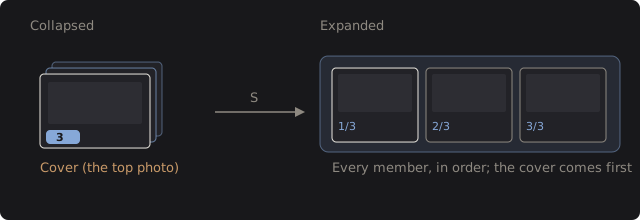
Section titled “Fold and unfold”A collapsed stack shows its cover with a blue count chip at the bottom left, for example 4. Click the chip, or select the photo and press S (by default), to unfold it. An unfolded stack shows every member, marked 1/4, 2/4 and so on, on a faint blue plate. Press S or click a chip again to fold it.
Image › Stacking › Expand All Stacks and Collapse All Stacks do every stack at once. The info panel shows “Stack 2 of 4” under the file name.
Change the cover or break up a stack
Section titled “Change the cover or break up a stack”- Set as Stack Cover makes the photo you selected the one shown when the stack is folded. It is also in the right-click menus of the grid and the filmstrip.
- Unstack (Ctrl+Shift+G) dissolves the stacks of the selected photos. The photos stay.
- Removing photos from the catalog shrinks a stack, and a stack left with one photo dissolves.
What a folded stack does
Section titled “What a folded stack does”Rating, labels and other commands act on the photos you selected, so select the members you mean. Collections are different: dragging a folded stack onto a collection, Add to Collection…, Remove from Collection and B for the Quick Collection all take the members folded under it, so a stack is never half in.
In the filmstrip, Left and Right skip folded members. Under a search, a stack shows only its matching members, and the chip reads “2 of 5”.
Technical details: what a stack is
A stack is a link kept on each photo: which stack it is in and its position. Whether a stack is folded is only view state, so every launch starts with all stacks folded. DarkRay does not group photos by capture time on its own.