
Merge brackets into an HDR panorama
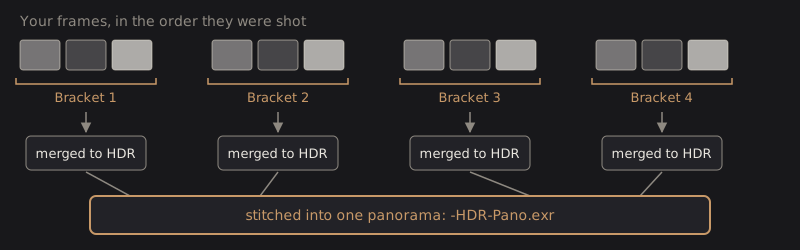
Use this when you shot a bracket at every position of a sweep. DarkRay finds the brackets, merges each one to HDR, then stitches the merged results.
Merge an HDR panorama
Section titled “Merge an HDR panorama”- Select every RAW frame of the sweep in the grid. At least four are needed: two brackets of two.
- Choose Image › Merge to HDR Panorama…. It has no key by default.
- Check the brackets DarkRay found, then set the rest as for a panorama.
- Click Merge.
The result is <reference>-HDR-Pano.exr, named after the first bracket’s middle frame and stacked
with the frames it used. See Merge photos for where it goes.
This is the slowest merge: every frame is decoded and merged before the stitch. In DarkRay’s own tests, a sweep of 12 frames took about 40 seconds to preview and about 3 minutes to merge.
Check the brackets
Section titled “Check the brackets”The Brackets section lists each bracket DarkRay found: a checkbox, up to three small thumbnails from darkest to brightest, “Bracket 2”, and a line such as “−1 / 0 / +1 EV · 851_2829–2831.NEF”. At the right of the title, a note says “212 matches”, “not connected” or “skipped”.
Under the list, a line like “4 brackets of 3, 4 merged.” tells you what DarkRay decided. Frames that don’t belong to a complete bracket are named under “Not in a bracket:” and left out.
- Frames per bracket starts on Auto, which shows the size it detected. Pick 2 to 9 to force a size when the guess is wrong. Changing it clears any brackets you unchecked.
- Uncheck a bracket to leave it out: it is neither merged nor stitched. Two brackets must stay checked.
- Align frames lines up the frames inside each bracket, as for an HDR merge.
If no repeating exposure pattern is found, the preview says “No exposure brackets found among these photos. Set Frames per bracket, or use Merge to Panorama for a single exposure.” With fewer than two brackets checked it says “An HDR panorama needs at least two brackets; check two or more.”

Deghost and the rest
Section titled “Deghost and the rest”Deghost works as it does for an HDR merge, with the same four amounts and the overlay, and applies to every bracket. Pixels that moved between a bracket’s frames take its middle exposure alone.
Projection, Level, Canvas, Blend, Normalize and Output are the same as in the panorama window.
Technical details: grouping and merging order
Frames are sorted by capture time, then file name. The bracket size is the shortest repeat, from 2 to 9, whose consecutive groups share one pattern of exposure differences within 0.2 EV, spanning at least 0.5 EV. The base exposure may drift from view to view, as it does in aperture priority. Where a bracket starts is chosen from the pauses between frames: the pauses between brackets are longer than the pauses inside one.
Each bracket merges with its middle exposure as the reference. The cameras for the stitch are solved from the references alone, so changing Align or Deghost re-merges without re-matching. The brackets stream through memory one at a time, so a sweep of twelve frames needs about as much memory as a three-frame panorama.
The canvas is scaled so it opens the way a single exposure of the whole scene would, with highlights above white kept.