
Choose a format and encoding
For sharing and printing, pick JPEG or a 16-bit TIFF and leave the encoding alone. The other choices matter when the file continues into grading or compositing software.
Pick a format
Section titled “Pick a format”| Format | What you get | Options |
|---|---|---|
| JPEG | 8-bit sRGB, lossy. Chroma subsampling is always off, so saturated edges stay clean. | Quality 1 to 95 |
| PNG | 8-bit sRGB, lossless. Larger files, no generation loss. | none |
| TIFF | The screen image at 16 bits with an sRGB profile, or a linear frame as 32-bit float with its profile. | Encoding |
| EXR | OpenEXR, the compositing apps’ format: a linear frame as half or full float, ZIP-compressed, with its primaries in the header. | Encoding, Half or Float |
JPEG and PNG are always the finished picture as you see it. Only TIFF and EXR offer a choice of encoding.
Pick an encoding
Section titled “Pick an encoding”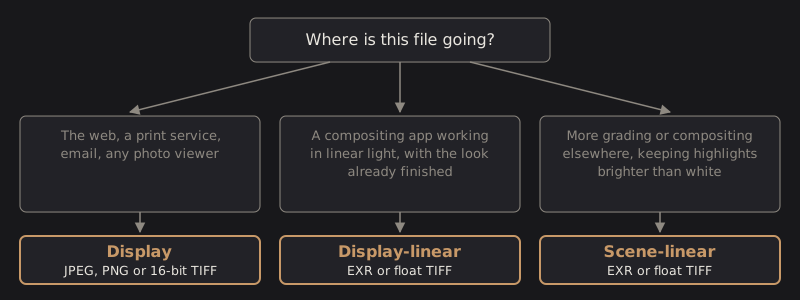
DarkRay edits in linear light, then applies its AgX display transform to make the picture you see. The encodings differ in where along that path the file is saved.
| Encoding | What is saved | Use it for |
|---|---|---|
| Display | The picture as on screen, AgX and every layer included, sRGB-encoded. A TIFF stores it at 16 bits. | The web, print, email, any photo viewer. It opens correctly anywhere. |
| Display-linear | The same finished picture before the sRGB curve: linear light, Rec.709 primaries, values from 0 to 1. A float TIFF or an EXR. | Bringing the finished look into a compositing setup that works in linear light. |
| Scene-linear | The frame before the display transform: no highlight roll-off, values above 1.0 and negative values kept, in the primaries you choose. A float TIFF or an EXR. | More grading or compositing elsewhere, where you want the brightest highlights intact. |
Scene-linear still includes your layers, crop and vignette. A display-referred look loaded from a
.cube file is left out of it, and the export report says so.
Pick primaries
Section titled “Pick primaries”For a scene-linear file, Primaries sets the color space it is written in.
| Primaries | Notes |
|---|---|
| ProPhoto | DarkRay’s working space and the widest: nothing is clipped. Most compositing apps need a conversion node to read it. |
| Rec.709 | Linear sRGB primaries, what most compositing setups assume. Colors outside Rec.709 come out negative. |
| ACEScg | ACES AP1 primaries, a common VFX working space. |
Display and display-linear files are always sRGB or Rec.709, and the row shows a note instead.
Choose EXR depth
Section titled “Choose EXR depth”Half is a 16-bit float: half the size and about three decimal digits, plenty for images. Float is 32-bit and full precision. It starts on Half.
Technical details: what each file contains
A float TIFF embeds the linear profile of its space. An EXR writes its primaries and white point as chromaticities in the header, and DarkRay reads an EXR back in whatever primaries its header names. A file with no chromaticities is read as sRGB.
Display output is sRGB or Rec.709 only, because AgX’s output matrix is sRGB. Display-linear encodes to exactly the 8-bit output.
A long-edge size is applied to the linear frame, by area averaging, before any conversion of primaries and before the encode. Values above 1.0 survive every editing step up to the display transform, which is why a scene-linear export can keep highlights that a JPEG has to roll off.